

The 2026 iteration of the Dell XPS 14 is not merely a refresh of an established premium ultrabook line. It represents a strategic shift in how thin-and-light laptops balance battery density, thermals, integrated graphics power, and user-focused design. For years, 14-inch laptops have been caught in a compromise triangle—battery life, performance, and portability. Dell’s latest XPS 14 attempts to collapse that triangle into a single, cohesive advantage.
At the center of this transformation is a new battery architecture built around 900ED cells, paired with Intel’s latest Intel Core Ultra Series 3 platform. Together, these changes redefine what creators, professionals, and even casual gamers should expect from a modern ultraportable system.
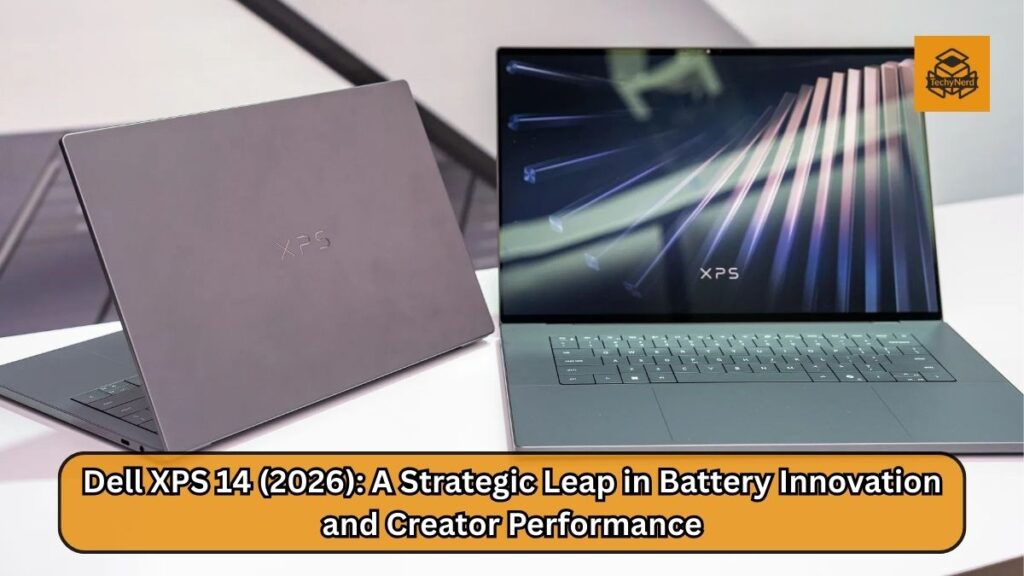
This is not just marketing language. It is a product strategy that signals where the premium Windows laptop ecosystem is heading over the next several years.
A New Battery Architecture That Changes the Conversation
Battery life has long been the Achilles’ heel of high-performance ultraportables. Historically, manufacturers have relied on either larger battery capacities or aggressive power throttling to extend longevity. Both approaches introduce compromise. Larger batteries increase weight and thickness. Aggressive throttling limits real-world usability.
Dell’s use of 900ED battery cells in a 70Wh configuration changes the density equation. These cells are physically smaller and lighter than conventional laptop battery cells, yet they pack higher energy density. In practical terms, that translates into up to 31 hours of video streaming and up to 43 hours of local video playback under optimal conditions.
For creators and professionals who travel frequently, this means something far more important than headline numbers. It means working across long-haul flights without anxiety. It means attending conferences without hunting for power outlets. It means multi-day productivity with intelligent charging cycles rather than constant dependency on adapters.
Equally significant is recharge efficiency. The XPS 14’s fast recharge capability allows users to restore substantial battery capacity in short bursts—an increasingly important feature in hybrid work environments where mobility defines productivity.
Battery innovation here is not isolated. It is foundational. The increased density frees internal space for improved thermals, better audio components, and structural refinements—all without sacrificing the system’s slim footprint.
Performance on Battery: No Longer a Compromise
One of the longest-standing myths in ultraportable computing is that performance collapses when unplugged. In earlier generations, CPU boost behavior and GPU clocks would drop dramatically once removed from AC power.
The 2026 XPS 14, powered by Intel’s Panther Lake architecture, challenges that paradigm. The Core Ultra Series 3 platform emphasizes efficiency cores and optimized power management that maintain sustained performance profiles on battery.
For creative professionals using demanding applications like Adobe Photoshop or Lightroom, this matters profoundly. Exporting high-resolution images, rendering layers, or processing RAW files while unplugged no longer feels like an exercise in compromise.
The integrated graphics architecture deserves particular attention. Intel’s new GPU design reportedly delivers up to 50% performance improvement over the prior generation’s integrated solutions. This narrows the gap between integrated and entry-level discrete GPUs, especially in light creative workloads and casual gaming.
In practical terms, this means smoother timeline scrubbing in video editing, faster image processing, and better 3D viewport responsiveness—all without the power penalties associated with dedicated graphics chips.
Thermals, Efficiency, and Sustained Performance
Performance claims are only meaningful if thermals support sustained output. Dell has re-engineered cooling within the XPS 14 to match its higher efficiency components. The improved airflow system and redesigned internal layout help maintain stable operating temperatures during extended workloads.
Importantly, the improved thermals do not come at the cost of acoustics. Premium ultrabooks increasingly face consumer backlash when fan noise becomes intrusive. Dell’s approach balances airflow optimization with quieter operation—particularly valuable in professional settings like video calls, shared workspaces, and classrooms.
The combination of advanced battery density and thermal optimization allows Dell to allocate power budgets more intelligently across CPU, GPU, and display subsystems. This systems-level efficiency is what distinguishes a well-engineered premium laptop from a spec-sheet device.
Display Technology: Efficiency Meets Immersion
Dell’s InfinityEdge display philosophy has matured significantly over recent generations. The 2026 XPS 14 integrates ultra-thin bezels on all four sides, creating an immersive visual field that enhances both productivity and entertainment.
Buyers can choose between a 2K IPS panel and a 2.8K OLED option. The OLED variant, protected by Gorilla Glass Victus, provides deep contrast ratios and vibrant color reproduction suited for photo editing, streaming, and design work.
What stands out is the integration of Variable Refresh Rate (VRR) technology. The display dynamically scales from as low as 1Hz to as high as 120Hz, adjusting to content demands. Static content like documents consumes minimal power, while high-frame animations and gaming scale upward for smoothness.
Dell claims up to 30% improved display efficiency compared to the previous generation. If accurate, this is a meaningful contributor to the system’s extended battery life. Displays are among the largest power consumers in laptops; optimizing them is critical to overall endurance.
Design and Build: Precision Engineering
The new XPS 14 weighs approximately 3.0 pounds and measures 14.6mm in thickness. These figures position it competitively within the premium 14-inch category.
The CNC-machined aluminum chassis provides structural rigidity while maintaining a refined aesthetic. Gorilla Glass 3 covers the palmrest, while Gorilla Glass Victus protects the OLED display. These material choices emphasize durability without adding unnecessary bulk.
Interestingly, many users initially mistake the XPS 14 for a smaller 13-inch device due to its compact footprint. This perception shift is a testament to Dell’s bezel reduction and internal component optimization.
The keyboard has also evolved. The zero-lattice design delivers improved key stability and typing precision. Physical function keys make a return, addressing user feedback that touch-based controls often lack tactile reliability.
An upgraded 8MP webcam improves video clarity, reflecting the reality that remote collaboration is no longer optional in modern workflows.
Audio and Multimedia Capabilities
The XPS 14 integrates a hidden 10W quad-speaker system. Audio quality in thin laptops has traditionally been underwhelming due to space constraints. However, denser battery cells free internal layout flexibility, enabling better acoustic chambers.
For content creators reviewing footage, casual gamers enjoying immersive audio cues, or professionals streaming media, improved speaker quality enhances overall usability without requiring external peripherals.
Work by Day, Play by Night
A frequent misconception about productivity laptops is that they are unsuitable for entertainment or gaming. While the XPS 14 is not positioned as a dedicated gaming system, its integrated graphics improvements significantly broaden its versatility.
Casual titles such as Fortnite, Minecraft, Counter-Strike 2, and League of Legends can run comfortably under optimized settings. The key advantage is efficiency. Unlike discrete GPUs that drain batteries rapidly, Intel’s integrated solution balances performance with longevity.
For users requiring serious gaming performance, systems like the Alienware Area-51 remain more appropriate. However, for creators who occasionally unwind with gaming sessions, the XPS 14 offers an impressive middle ground.
Strategic Positioning in the Premium Laptop Market
The premium Windows laptop space has become intensely competitive. Apple’s MacBook lineup, particularly the MacBook Air 13, has dominated efficiency conversations.
Dell’s response is strategic rather than incremental. By focusing on battery density innovation and efficient integrated graphics, Dell is positioning the XPS 14 as a Windows alternative that competes not only on raw power but on endurance and portability.
This reflects a broader industry trend. The future of premium laptops is not about chasing extreme specifications. It is about intelligent integration—where battery, display, silicon, and thermals work harmoniously.
Industry Implications
The introduction of 900ED battery cells signals potential shifts in supply chains and component sourcing. If such density becomes standard, we may see thinner devices with larger effective capacities across the industry.
Similarly, Intel’s emphasis on integrated GPU performance suggests a strategic attempt to reduce reliance on discrete GPUs in mid-tier systems. This could reshape OEM design priorities, focusing more on efficient all-in-one silicon solutions.
Dell’s XPS 14 is therefore not just a single product launch. It is a directional statement about where high-end portable computing is heading.
FAQs
- What makes the 900ED battery cells different from traditional laptop batteries?
They offer higher energy density in smaller, lighter cells, enabling longer battery life without increasing size. - How long can the Dell XPS 14 last on a single charge?
It can reach up to 31 hours of streaming or 43 hours of local video playback under optimal conditions. - Does performance drop significantly when running on battery?
The new Intel Core Ultra Series 3 processors are optimized to maintain strong performance even unplugged. - Is the XPS 14 suitable for professional photo editing?
Yes, it handles applications like Photoshop and Lightroom efficiently with improved integrated graphics. - Can it handle gaming?
It supports casual gaming titles effectively thanks to enhanced integrated GPU performance. - What display options are available?
Users can choose between a 2K IPS panel or a 2.8K OLED display with VRR support. - How thin and light is the laptop?
It weighs about 3.0 pounds and measures 14.6mm in thickness. - Is the chassis durable?
Yes, it uses CNC-machined aluminum and Gorilla Glass protection for durability. - Does it support fast charging?
Yes, the battery can recharge quickly to minimize downtime. - Who is the ideal user for the XPS 14?
Creators, professionals, and mobile users seeking high performance with exceptional battery life.